Part 2: Equilibrium potential of a LiFePO4/C battery
You will calculate the equilibrium potential and use Bayesian error estimation
to quantify how sensitive the calculated equilibrium potential is towards
choice of functional. The notebook is batteries2.ipynb.
Setup and calculate FePO4 and LiFePO4 structures
Use these and the previous Li metal calculation to determine the equilibrium potential of a FePO4/Li battery
Get an uncertainty estimation on the potential by using an ensemble of functionals called a
BEEFEnsembleUsing values from the previous day calculate the equilibrium potential of the full Li FePO4/C battery
Day 3 - Equilibrium potential
Today you will study the LiFePO4 cathode. You will calculate the equilibrium potential and use Bayesian error estimation to quantify how sensitive the calculated equilibrium potential is towards choice of functional. After today you should be able to discuss:
The volume change during charge/discharge.
The maximum gravimetric and volumetric energy density of a FePO4/C battery assuming the majority of weight and volume will be given by the electrodes.
Uncertainty in the calculations.
Some of calculations you will perform today will be tedious to be run in this notebook. You will automatically submit some calculations to the HPC cluster directly from this notebook. When you have to wait for calculations to finish you can get started on addressing the bullet points above.
FePO4
First we will construct an atoms object for FePO4. ASE can read files
from in a large number of different
ase.io.
However, in this case you will build it from scratch using the below
information:
# Positions:
# Fe      2.73015081       1.46880951       4.56541172
# Fe      2.23941067       4.40642872       2.14957739
# Fe      7.20997230       4.40642925       0.26615813
# Fe      7.70070740       1.46880983       2.68199421
# O       1.16033403       1.46881052       3.40240205
# O       3.80867172       4.40642951       0.98654342
# O       8.77981469       4.40642875       1.42923946
# O       6.13142032       1.46881092       3.84509827
# O       4.37288562       1.46880982       0.81812712
# O       0.59764596       4.40643021       3.23442747
# O       5.56702590       4.40642886       4.01346264
# O       9.34268360       1.46880929       1.59716233
# O       1.64001691       0.26061277       1.17298291
# O       3.32931769       5.61463705       3.58882629
# O       8.30013707       3.19826250       3.65857000
# O       6.61076951       2.67698811       1.24272700
# O       8.30013642       5.61459688       3.65856912
# O       6.61076982       0.26063178       1.24272567
# O       1.64001666       2.67700652       1.17298270
# O       3.32931675       3.19822249       3.58882660
# P       0.90585688       1.46880966       1.89272372
# P       4.06363530       4.40642949       4.30853266
# P       9.03398503       4.40642957       2.93877879
# P       5.87676435       1.46881009       0.52297232
# Unit cell:
#            periodic     x          y          z
#   1. axis:    yes    9.94012    0.00000    0.00000
#   2. axis:    yes    0.00000    5.87524    0.00000
#   3. axis:    yes    0.00000    0.00000    4.83157
You can use the cell below as a starting point.
fepo4 = Atoms('Fe4O...',
              positions=[[x0, y0, z0], [x1, y1, z1], ...],
              cell=[x, y, z],
              pbc=[True, True, True])
Visualize the structure you have made. Explore the different functions in
the visualizer and determine the volume of the cell (View -> Quick Info).
view(fepo4)
For better convergence of calculations you should specify initial magnetic moments to iron. The iron will in this structure be Fe\(^{3+}\) as it donates two 4s electrons and one 3d electron to PO\(_4^{3-}\). What is the magnetic moment of iron? For simplicity you should assume that FePO4 is ferromagnetic.
for atom in fepo4:
    if atom.symbol == 'Fe':
        atom.magmom = ?
Now examine the initial magnetic moments of the system using
ase.Atoms.get_initial_magnetic_moments().
magmoms = fepo4.xxx()
print(magmoms)
Write your atoms object to file.
write('fepo4.traj', fepo4)
For this calculation you will use the BEEF-vdW functional developed by Wellendorff et al.. Although there are better alternatives for calculating the energy of bulk systems, the BEEF-vdW has a build-in ensemble for error estimation of calculated energies using a statistical approach. An ensemble is essentially a collection of different functionals that are used to sample the space of possible solutions. By considering this collection one can obtain an assessment of the uncertainty associated with the functional. This is particularly useful in DFT calculations where the exact functional form is not known, and different approximations can lead to varying results.
In the set-up of this calculator you will append relevant keyword values into a dictionary, which is fed to the calculator object. To save computational time while keeping the calculations physically sound, the following should be used:
params = dict(
    mode=PW(500),  # plane wave energy cutoff
    nbands=-40,  # the number on empty bands had the system been spin-paired
    kpts={'size': (2, 4, 5),  # k-point mesh
          'gamma': True},
    spinpol=True,  # performing spin polarized calculations
    xc='BEEF-vdW',  # exchange-correlation functional
    occupations=FermiDirac(
        width=0.1),  # smearing
    convergence={'eigenstates': 1.0e-4,  # eV^2 / electron
                 'energy': 2.0e-4,  # eV / electron
                 'density': 1.0e-3},
    mixer=Mixer(0.1, 5, weight=100.0))  # mixer used during SCF optimization
DFT suffers from the self-interaction error. An electron interacts with
the system electron density, to which it contributes itself. The error is
most pronounced for highly localized orbitals.
Hubbard U
is used to mitigate the self-interaction error of the highly localized
3d-electrons of Fe. This is done in GPAW using the setups keyword.
params['setups'] = {'Fe': ':d,4.3'} # U=4.3 applied to d orbitals
Make a GPAW calculator and attach it to the atoms object. Here you will
use ase.Atoms.get_potential_energy()
to start the calculation.
calc = GPAW(**params)
fepo4.calc = calc
epot_fepo4_cell = fepo4.get_potential_energy()
print(epot_fepo4_cell)
write('fepo4_out.traj', fepo4)
You will use the ensemble capability of the BEEF-vdW functional. You will need this later so you should write it to file so you do not have to start all over again later. Start by obtaining the required data from the calculator, i.e., the individual energy of each term in the BEEF-vdW functional expansion. Get the energy difference compared to BEEF-vdW for 2000 ensemble functionals.
ens = BEEFEnsemble(calc)
dE = ens.get_ensemble_energies(2000)
Print the energy differences to file. This is not the most efficient way of printing to file but can allow easier subsequent data treatment.
with paropen('ensemble_fepo4.dat', 'a') as result:
    for e in dE:
        print(e, file=result)
You now have what you need to make a full script (call it fepo4.py).
Submit the calculation to the HPC cluster. The calculation should take
around 10 minutes.
$ mq submit fepo4.py -R 8:1h # submits the calculation to 8 cores, 1 hour
Run the below cell to examine the status of your calculation.
$ mq ls
Once the calculation begins, you can run the cells below to open the error log and output of the calculation in a new window. This can be done while the calculation is running.
$ tail fepo4.py.*.err
$ tail fepo4.py.*.out
LiFePO4
You will now do similar for LiFePO4. In this case you will load
in a template structure called lifepo4_wo_li.traj missing
only the Li atoms.
lifepo4_wo_li = read('lifepo4_wo_li.traj')
Visualize the structure.
view(lifepo4_wo_li)
You should now add Li into the structure using the fractional coordinates below:
# Li  0    0    0
# Li  0    0.5  0
# Li  0.5  0.5  0.5
# Li  0.5  0    0.5
Add Li atoms into the structure, e.g., by following the example in this ASE tutorial: Manipulating Atoms. Visualize the structure with added Li.
view(lifepo4)
Ensure that the magnetic moments are as they should be, once again assuming ferromagnetism for simplicity.
print(lifepo4.get_initial_magnetic_moments())
At this point you should save your structure by writing it to a trajectory file.
write('lifepo4.traj', lifepo4)
You should now calculate the potential energy of this sytem using the method and same calculational parameters as for FePO4 above. Make a full script in the cell below similar to what you did above for FePO4 and make sure that it runs. If the code runs, submit to the HPC cluster as you did above. The calculation takes approximately 10 minutes.
If you instantiate the GPAW calculator like this:
calc = GPAW(txt='lifepo4.txt, **params)
then you can follow the calculation by looking at the lifepo4.txt
log-file.
$ mq submit lifepo4.py -R 8:1h
$ mq ls
$ mq ls
...
$ mq ls  # OK, it started running
$ tail lifepo4.txt
Li metal
We use a Li metal reference to calculate the equilibrium potential. On exercise day 2 you used a Li metal reference to calculate the intercalation energy in the graphite anode. The approach is similar here. Just read in the result of the calculation with DFTD3 and attach a new calulator to it.
from ase.dft.bee import BEEFEnsemble
from ase.io import read
from ase.parallel import paropen
from gpaw import GPAW, PW, FermiDirac

li_metal = read('Li-metal-DFTD3.traj')  # Change file name accordingly

calc = GPAW(mode=PW(500),
            kpts=(8, 8, 8),
            occupations=FermiDirac(0.15),
            nbands=-10,
            txt=None,
            xc='BEEF-vdW')

li_metal.calc = calc
li_metal.get_potential_energy()
li_metal.write('li_metal.traj')
Now calculate the ensemble in the same way as for FePO4 and LiFePO4.
ens = BEEFEnsemble(calc)
li_metal_ens_cell = ens.get_ensemble_energies(2000)
with paropen('ensemble_li_metal.dat', 'a') as result:
    for e in li_metal_ens_cell:
        print(e, file=result)
Calculate equilibrium potential and uncertainty
You can now calculate the equilibrium potential for the case of a FePO4/Li metal battery from the intercallation energy of Li in FePO4. For simplicity, use that assumption that all vibrational energies and entropic terms cancel each other. You should now have completed all submitted calculations before you proceed.
from ase.io import read
fepo4 = read('fepo4_out.traj')
lifepo4 = read('lifepo4_out.traj')
li_metal = read('li_metal.traj')
epot_fepo4_cell = fepo4.get_potential_energy()
epot_lifepo4_cell = lifepo4.get_potential_energy()
epot_li_metal_cell = li_metal.get_potential_energy()
print('epot_fepo4_cell =', epot_fepo4_cell)
print('epot_lifepo4_cell =', epot_lifepo4_cell)
print('epot_li_metal_cell =', epot_li_metal_cell)
The calculated energies are for the full cells. Convert them to the
energy per formula unit. The
len() function can be quite helpful for this.
epot_fepo4 = ...
epot_lifepo4 = ...
epot_li_metal = ...
print(epot_fepo4, ...)
No calculate the equilibrium potential under the assumption that it is given by \(V_{eq} = \Delta U / e\), where \(U\) is the electronic potential energy of the system and \(e\) is the number of electrons transfered.
# V_eq = ...
You will now calculate the error estimate for the Li intercallation energy in FePO4 using the BEEF ensemble results. Start by loading in the files. Wait a few minutes and rerun the cell if the number is not 2000 for all of them.
fepo4_ens_cell = np.genfromtxt('ensemble_fepo4.dat', max_rows=2000)
lifepo4_ens_cell = np.genfromtxt('ensemble_lifepo4.dat', max_rows=2000)
li_metal_ens_cell = np.genfromtxt('ensemble_li_metal.dat', max_rows=2000)
print('number of functionals in ensemble=', len(fepo4_ens_cell))
print('number of functionals in ensemble=', len(lifepo4_ens_cell))
print('number of functionals in ensemble=', len(li_metal_ens_cell))
Note that these are energies per cell and not per formula unit. Convert them as you did the potential energies above. Note that you are now performing the operation on a list of length 2000 and not a single float value as before.
# fepo4_ens = fepo4_ens_cell / ...
# ...
# ...
Make a list of equilibrium potentials.
# V_eq_ens = lifepo4_ens - ...
Use the plot command below to visualize the distribution.
plt.hist(V_eq_ens, 50)
plt.grid(True)
The result should look like this:
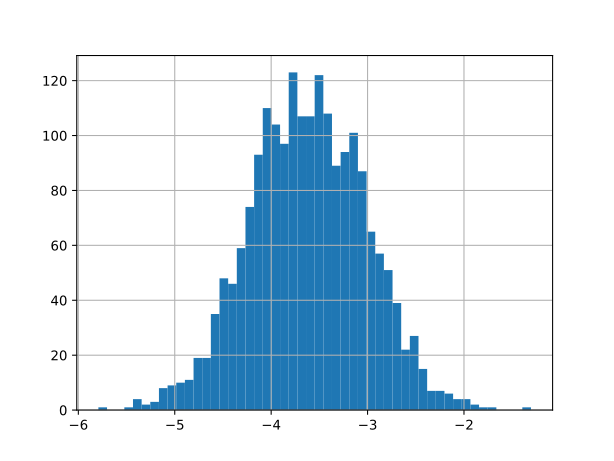
Use the numpy.std()
to obtain the standard deviation of the ensemble.
# error = ...
# print(error)
The equilibrium potential for a FePO4/Li battery is thus as a good estimate:
print(f'{V_eq:.2f} V +- {error:.2f} V')
You can get the equilibrium potential for the FePO4/C battery using the intercallation energy of Li in graphite, that you calculated on Day 2. What equilibrium potential do you find? How does that compare to the cell voltage you can obtain from FePO4/C batteries?
Make sure you are able to discuss the bullet points at the top of this notebook.
Bonus
How does the predicted error estimate change if you consider the full reaction from Li in graphite + FePO4 to empty graphite + LiFePO4.